(only covering content that is not included in the notes yet)
Assignment 1: Generative AI concepts
V1: What is Generative AI?
Generative AI refers to machine learning models capable of generating new content based on previously seen data when given a prompt.
A prompt is any form of input data (e.g., text, image, etc.) that guides a generative model in producing content. Different types:
- Text-to-Image
- Text-to-Text
- Image-to-Image
Applications of GenAI
- Drafting professional content such as sales emails or marketing advertisements.
- Analyzing complex datasets like financial reports or medical records.
- Generating content for creative tasks such as video game 3D assets or ad prototypes.
- Assisting legal professionals in navigating regulatory environments.
- Personalizing educational content and automating industrial engineering tasks.
Challenges and Future Considerations
- Generative AI will augment jobs rather than replace them entirely. Some industries may experience more disruption than others.
V2: Generative AI in ML landscape
Discriminative Models: Analyze and classify input using labeled data. Training involves feeding model labeled data. Once trained model predicts the label of new image and expresses confidence in that prediction.
Generative Models: Predict and generate new data based on given conditions.
Generative AI systems often combine discriminative and generative models to produce smarter outputs
V3: Evolution of Generative AI
In 2023, generative AI entered mainstream awareness with ChatGPT reaching 100M monthly users within two months.
Key factors driving development:
- Specialized processors like GPUs and TPUs accelerated training efficiency.
- Availability of massive training datasets
- Market and geopolitical competition
- Parallelization innovations enabled simultaneous computations, crucial for training larger models.
- Synthetic data generation techniques augmented real datasets to expand training material.
- Transformers revolutionized text processing by analyzing entire word sequences and relationships simultaneously.
- Reinforcement Learning with Human Feedback (RLHF) improves models by learning from user ratings and corrections.
- Public product feedback loops create accelerating improvements via a “flywheel” effect.
V4: Model design and Data collection
The development process includes four key steps:
- Research and design to choose model architecture
- Collecting and preparing training data
- Training the model
- Evaluating the model
Privacy and Security in Data Collection
- Large datasets often include user-generated content with personally identifiable information (PII).
- Developers must anonymize or aggregate data (e.g., blurring faces in security footage) to protect privacy.
- Robust security controls are necessary to prevent unauthorized access or misuse of sensitive data.
- Failure to secure data may lead to copyright and ownership issues.
V5: Model Training
- Training a generative AI model is compared to traveling, where the journey depends on hardware, time, and cost.
- Hardware dictates training speed—training on a laptop is like walking, local GPUs are like driving a car, and using server farms with TPUs is like flying a jet.
- Time represents how far the training journey is—more complex models, larger datasets, and more training iterations extend the time.
- Cost reflects the expense of training—walking (laptop) is free but slow, while faster training (TPUs) is costly.
Graduate to advanced techniques
Initial model training yields a general or foundation model, which is then refined using advanced training techniques. These techniques include:
- Transfer Learning and Fine-Tuning – reusing existing knowledge for new tasks.
- Reinforcement Learning with Human Feedback (RLHF) – using human feedback to guide learning.
- Custom Embeddings – embedding specific concepts into the model.
Thumbs up for better responses
- RLHF uses collective user feedback to guide model adjustments.
- Positive feedback tells the model to replicate similar outputs; negative feedback discourages specific behaviors.
- This feedback loop results in more aligned and refined content generation over time.
V6: Model Evaluation
Why Evaluate Anyway?
- helps track progress when models are trained longer or redesigned.
- Evaluation allows for rigorous comparison across models to identify the best performer for a specific task.
- Benchmarking AI against human performance reveals areas where AI can complement or replace human efforts.
Evaluation Methods
- Quantitative methods include discriminative metrics (e.g., accuracy) and generative-specific metrics (e.g., realism, diversity).
- Human-centered metrics include human performance comparisons and subjective assessments.
Discriminative Model Evaluation Techniques: Techniques like accuracy are suited for tasks with well-defined outcomes, making them easy to calculate and interpret.
Generative Model-Specific Metrics:
- Realism – how lifelike the output is.
- Diversity – the variety among outputs.
- Novelty – uniqueness compared to training data.
Human Performance Comparison: AI models are evaluated on standardized tests and results are compared to human performance. This showcases AI's ability to interpret, reason, and apply knowledge.
Turing’s Classic Test: A side-by-side chat window of human vs. AI with the evaluator in the middle. The Turing Test assesses if an AI can mimic human behavior convincingly in a text-based conversation. If a human judge can’t tell the AI apart from a human, the AI passes.
V7: Evaluating and mitigating social bias
What is Social Bias?
Social bias in AI refers to systematic unfairness, often impacting certain social groups disproportionately. As generative AI integrates into real-world systems (e.g., hiring, healthcare), bias can result in serious social harm. Fairness is subjective and varies across cultural and individual perspectives, complicating the definition of “unbiased.” Despite differing opinions, focusing on shared human values can guide fair and responsible AI development.
Where Bias Appears
- Bias in Data: Models trained on non-diverse or misrepresentative data can produce skewed and unfair outputs, as they can only replicate patterns present in the training data.
- Bias in Models: Even with neutral data, model objectives or design choices can introduce bias—e.g., optimizing for “winning votes” in political speech generation may unintentionally promote division.
- Bias in Use: Models can be misused by users through prompt engineering or malicious intent, emphasizing the need for responsible deployment and usage to mitigate bias.
Identifying Bias in Data and Models
- Representation Analysis: Analyzes how the model refers to different groups (e.g., language used for men vs. women).
- Fairness Metrics: Algorithms evaluate equality in treatment, opportunity, and accuracy across social groups. Provide quantitative tools to uncover issues that humans might overlook.
- Human Audits: Involve humans manually reviewing outputs for bias. While time-intensive, audits offer qualitative insights into subjective fairness.
Mitigating Bias in Data and Models
- Data Diversification: Expanding and balancing training datasets to ensure underrepresented groups are fairly included.
- Model Adjustment: Prioritizing inclusion of minority or sensitive data categories during model training to enhance representation.
- Adversarial Training: Similar to GANs: a secondary model is trained to detect bias, feeding that feedback to improve the primary model.
V8: Copyright and ownership
An AI-generated painting won at the Colorado State Fair, sparking debate over creative credit. Questions arose about who owns the work—the prompt engineer, the AI company, training data artists, or the AI itself. The case highlights blurred lines in authorship and rights in AI-generated art.
Legal Complexity
IP law, built for human creators, struggles to keep pace with generative AI. As the technology evolves, legal frameworks must adapt to address intellectual property, data privacy, and changing industry norms.
Best Practices for IP in Generative AI
Traditional copyright laws do not cleanly apply to AI-generated works. Best practices include:
- Always check the copyright status of training data—unauthorized use can pose legal risks (e.g., using copyrighted code in a code-generating AI).
- Engage legal professionals to navigate grey areas and reduce liability.
- Stay updated on changes in global copyright law; laws vary across regions and evolve quickly.
- Legal ignorance does not exempt violations or privacy breaches.
Legal Standpoint (As of Now)
Most jurisdictions (including the U.S., UK, and EU) do not recognize AI as an author. Therefore, the AI cannot hold copyright.
The prompter (human) is often considered the closest candidate for ownership, especially if: They provided substantial creative input. And he output was not fully autonomous (e.g., iterative refinement, specific intent).
However, if the AI tool’s (GPT, Gemini) terms of service assign IP to the company, then the company may hold the rights, not the prompter.
V9: Responsible generative AI applications
- Deepfakes: Synthetic media can be humorous or artistic but also pose risks like defamation, misinformation, and loss of public trust.
- Misinformation Campaigns: AI enables large-scale creation and spread of false content, influencing opinions and potentially inciting unrest.
- Enhanced Hacking: AI can aid cyberattacks, including on critical infrastructure, especially when systems are powerful but poorly moderated.
Detection and Prevention
Human-in-the-Loop: Visual inference: Flow of AI generation → human editor → publication. Ensure human oversight for all significant AI outputs, especially in public-facing content.
Identity verification: Enforcing "Know Your Customer" (KYC) verification helps confirm user identities, reducing fraud and preventing misuse by allowing access only to legitimate users.
Monitoring Input and Output: AI systems should track user prompts and generated content, blocking harmful inputs and banning users who violate guidelines.
Jailbreaking Prompts: Users may attempt to bypass safety filters with disguised inputs; developers must sanitize and review AI outputs before release.
Misuse of Benign Outputs: Even harmless content, like legal templates, can be repurposed for unethical or fraudulent activities.
Watermarking and Attribution: Invisible watermarks can help trace AI-generated content, but may be removed by malicious users, requiring legal and enforcement support.
V10: Artificial General Intelligence (AGI)
AGI displays human-like intelligence with broad knowledge, cross-domain reasoning, social skills, creative and critical thinking, and multi-modal perception (e.g., sight).
Unlike narrow AI, AGI can not only perform human tasks but also outperform humans in multiple domains, introducing both great benefits and societal risks.
AGI can lead to a productivity boom by automating intellectual labor, boosting human efficiency, and enabling more leisure time. AGI can accelerate research breakthroughs in medicine, education, and science by speeding up experimentation and knowledge generation.
Severe Cons of AGI
Automation by AGI could eliminate or transform traditional jobs, causing widespread economic disruption.
AGI can be misused on a massive scale if its values don’t align with human interests, possibly leading to harmful outcomes.
The most extreme concern is that AGI could pose an existential threat, potentially subjugating or eliminating humanity—frequently depicted in science fiction.
Three Control Approaches
- Hard Constraints: Use physical and digital isolation (“boxing”) to restrict AGI access to critical systems, and implement kill switches for emergency shutdowns.
- Iterative Development: Deploy AGI in controlled environments first to detect and fix misalignment.
- Constitutional AI: Embed human values via top-down rules scored and refined during training, differing from user-driven RLHF.
- Multi-Stakeholder Engagement: Involve engineers, ethicists, and policymakers to integrate diverse perspectives into AGI design.
- Regulation & Oversight: Establish AI safety laws, transparency standards, and testing protocols.
- International Collaboration: Coordinate global policies to manage AGI’s cross-border impacts responsibly.
V11: Bringing new AI into Old workflows
Advantages of Generative AI:
- Possess deep knowledge from training data, often deeper than individual human professionals.
- Respond significantly faster than human teams.
- Cost-effective compared to human labor.
Limitations of Generative AI:
- Prone to hallucinations (fabricating information) and exhibiting biases.
- Lack common sense due to absence of human-like environmental experience.
- Require workflow and interface adjustments for successful integration into human teams.
Modes of Human-AI Integration
- Augmentation: AI performs parts of a task; humans refine the output (e.g., AI generates a rough concept video, human edits it).
- Co-creation: Human and AI collaborate in real-time to co-develop content (e.g., discussing and building a slide deck together).
- Replacement: AI fully automates a task (e.g., autonomously monitors ocean temperatures and solves equipment issues).
V12: Progress in Generative AI
- Progress in generative AI is driven by a combination of universities, governments, open-source communities, startups, and large corporations, each contributing in unique ways.
- Governments shape the AI landscape through regulations and direct funding (e.g., DARPA funding explainable AI research).
- Civic institutions like CIFAR contribute valuable resources, analyses, and datasets such as CIFAR-10.
- Open-source projects provide essential access to tools and models, accelerating innovation by making experimentation easier.
- Companies build and integrate generative AI to gain competitive advantages and showcase technological progress.
- Large corporations like Google not only use generative AI but also contribute to research (e.g., transformers originated from Google).
- Companies must balance between publishing research to attract talent and community support vs. protecting intellectual property and preventing misuse.
V13 & V14 Absolute Bullshit
Assignment 2: LLMs Concepts
V1: The rise of LLMs in the AI landscape
A hierarchical visual likely shows a tree or nested structure representing fields:
- Large Language Models (LLMs): NLP models trained with deep learning on massive text datasets.
V2: Real world applications
Visual Question Answering (VQA)
- LLMs in VQA settings analyze both image and text to answer questions related to visual inputs.
- They can identify objects, interpret relationships, and even respond creatively (e.g., describing a zebra and making a related joke).
V3: Challenges of Language Modelling
We already have studied much,
Types of learning:
- Single-Task Learning: Traditional models are trained for one task at a time, like question-answering or translation. Requires significant resources to train and maintain separate models. These models are typically unimodal (e.g., only text), limiting their ability to handle diverse data types like images or audio.
- Multi-Task Learning: Modern LLMs can be trained on multiple tasks simultaneously. Shared learning improves generalization and reduces the amount of data needed per task. However, multi-task training may slightly reduce performance on individual tasks compared to models specialized in one task.
V4: Novelty of LLMs
LLMs are called “large” due to two main factors:
- The scale of training data—massive and diverse text corpora.
- The number of parameters—learned weights that encode complex patterns, rules, and associations in language.
V5: Generalized overview of NLP
Key components of LLM training include:
- Text Pre-processing – cleaning and preparing raw text
- Text Representation – converting words into vectors or embeddings
- Pre-training – general learning from large-scale data
- Fine-tuning – task-specific learning
- Advanced Fine-tuning – domain adaptation or instruction tuning
V6: Finetuning
Absolute bs
V7: Learning techniques
- Zero-shot Learning: The model performs tasks without any prior examples, relying solely on its general knowledge and language understanding. Example: Recognizing a zebra by being told it looks like a striped horse.
- Few-shot & One-shot Learning: The model learns from a small number of examples (few-shot), or just one (one-shot), similar to solving a test question based on minimal study. Visual analogy: A classroom with one notebook and a single question.
- Multi-shot Learning: The model is given several examples to learn effectively, combining prior knowledge with new data to generalize better. Example: Learning to recognize Labradors after being shown Golden Retriever images.
V8: Building blocks to train LLMs
BS
V9: Introducing the transformer
BS
V10: Attention mechanisms
BS
V11: Advanced Finetuning
RLHF Process
Step 1: Model Output Generation
- The model produces multiple candidate responses for a given prompt, leveraging its pre-trained knowledge.
Step 2: Human Expert Evaluation
- A human expert (e.g., a language teacher or domain specialist) reviews and ranks the model's responses based on quality factors such as accuracy, relevance, and coherence.
Step 3: Model Learning from Feedback
- The model uses the expert rankings to adjust its response generation, learning to produce outputs more aligned with human preferences.
- This feedback loop continues, progressively refining the model’s ability to generate better responses over time.
V12: Data Concerns and considerations
BS
V13: Ethical and environmental concerns
BS
V14: Where are LLMs headed?
- Model Explainability: Future LLMs must be explainable to build trust by clearly showing how outputs are generated, enabling users to understand decisions and correct biases or errors (e.g., explaining route choices in a trip planner).
- Efficiency: Research aims to make LLMs faster and less energy-consuming through model compression and optimization, promoting greener AI and accessibility on low-resource devices.
- Unsupervised Bias Handling: Advances focus on unsupervised methods where LLMs autonomously detect and reduce biases from training data patterns, though challenges remain in avoiding new subtle biases.
- Enhanced Creativity: LLMs generate creative content like text, art, and music based on learned data, with ongoing research into mimicking human-like emotional behavior to improve interaction despite lacking true understanding.
Assignment 3: LLM applications with LangChain
V1: The Langchain ecosystem
LangChain revolutionized integration of AI and LLMs into products since 2022.
LangChain is part of a larger ecosystem including:
- LangSmith: For deploying LLM applications into production.
- LangGraph: For creating AI agents.
Components to Manage
- LLM: Model provider can be proprietary (e.g., OpenAI) or open-source.
- Decision Mechanism: Logic to decide whether to provide product info or troubleshooting advice.
- Database: Customer support articles repository for the chatbot to reference.
- Integration Mechanism: System to find and plug in relevant support articles dynamically.

V2: Prompt templates
- Prompt templates enable modular, reusable prompts for Large Language Models (LLMs).
- They serve as recipes combining instructions, questions, examples, and additional context for the model.
Creating Prompt Templates
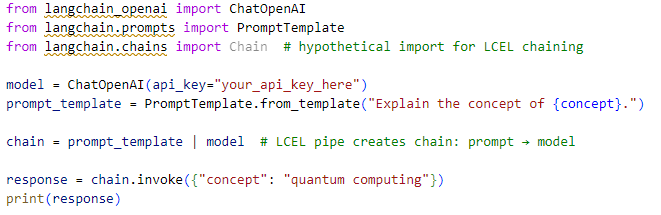
- Use the PromptTemplate class in LangChain to create templates.
- Start with a template string containing placeholders in curly braces {} to denote variables for dynamic insertion.
- Example template string concept: "Explain the concept of {concept}."
- Convert this string into a prompt template using .from_template() method.
- Use .invoke() with a dictionary to substitute variables dynamically.
- Output shows the placeholder replaced with the dictionary value.

Integrating PromptTemplate with LLMs
- Define an LLM model instance as usual.
- Passing user input to prompt template (fills placeholders)
- Feeding filled prompt into the LLM for response generation
- Calling .invoke() on this chain with a dictionary passes user input through the template and model, producing an output response.
Chat Models and ChatPromptTemplate
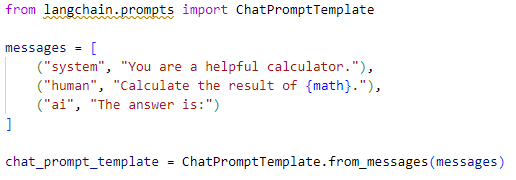
- system role: defines model behavior (e.g., "Act as a calculator").
- human role: user inputs.
- ai role: example model responses or assistant behavior.
- Use the ChatPromptTemplate class to create prompts with message roles.
- Construct a list of tuples (role, message) with placeholders for variables.
- Pass this list to .from_messages() method to build the chat prompt template.
- Curly braces {} indicate input variables in messages (e.g., {math}).
V3: Few shot prompting
Few-shot prompting enhances LLM prompting by providing multiple example pairs of inputs and outputs.
PromptTemplate and ChatPromptTemplate handle single-example prompts well.
These classes become unwieldy when many examples from datasets need to be incorporated.
The FewShotPromptTemplate class is designed to handle datasets of multiple examples, turning them into prompt templates that feed more context to the LLM.

FewShotPromptTemplate
- The list of example dictionaries (multiple Q&A pairs),
- The example formatting template,
- A suffix template defining how user input is appended to the prompt,
- The variable name to assign user input (e.g., "question").
- Constructs a full prompt containing all examples plus the current user input for few-shot learning.

Integration with a Chain
- Instantiate an LLM model.
- Use the LCEL pipe operator (|) to chain the few-shot prompt template with the model.
- Invoke the chain with user input dictionary to get a response.
- Extract model output from the .content attribute of the response object.
- This shows the model uses the rich context from few-shot examples to produce a relevant answer.

V4: Sequential chains
Sequential chains allow solving problems that require multiple, stepwise inputs and outputs, where each step depends on the previous one.
Coding Sequential Chains
- Destination prompt: Takes the user’s destination input and generates a list of suggested activities.
- Activities prompt: Takes the top three activity suggestions and creates a detailed itinerary for one day.
- Pass the destination prompt template output to the LLM.
- Parse the LLM response as a string.
- Assign this string to a variable activities used as input for the second prompt.
- Pipe the second prompt template output into the LLM.
- Parse the final itinerary response as a string.
- Parentheses are used to allow the chaining code to be split cleanly across multiple lines for readability.

V5: introduction to langchain agents
What are Agents?
- Agents in LangChain are components that use language models to determine which actions to take.
- Agents utilize tools, which are callable functions enabling interaction with external systems or data.
- Tools can be generic utilities (e.g., data transformation) or task-specific (e.g., calling APIs).
- Agents can also call other chains or agents as tools, enabling nested and complex workflows.
ReAct Agents
- The agent thinks about the problem and selects the appropriate tool.
- It acts by calling the tool.
- Then observes the output of the tool to inform the next step.
- Thinks about which tool to use (a weather tool).
- Calls the weather tool with the query.
- Observes the response and formulates the answer.
LangGraph: Agent Design Ecosystem
- LangGraph is a branch of the LangChain ecosystem dedicated to designing agentic systems.
- Provides a unified, tool-agnostic syntax for building and orchestrating agents.
- Visual: Screenshot of LangGraph architecture showing agents connected to tools with flexible APIs.
- The course uses a specific LangGraph version for consistency.
Creating a ReAct Agent: Math Problem Example

The llm-math tool enables the agent to perform calculations, useful because LLMs struggle with precise math.
The agent can be invoked with:

How the ReAct Agent Works
The agent's execution produces a series of messages:
- Initial prompt defining the problem.
- Model's internal reasoning to select the math tool and convert the query.
- The tool’s calculated result (e.g., numeric output).
- Final response generated by the model after observing the tool output, with additional formatting (e.g., rounding).
V6: Custom tools for agents
Tool Formats
- Each tool must have a .name attribute, which identifies the tool.
- Example: If the description indicates the tool solves math problems, the LLM will call it when faced with such tasks.
- The return_direct parameter controls whether the agent stops after calling this tool (if True) or continues reasoning (if False).
Defining a Custom Function
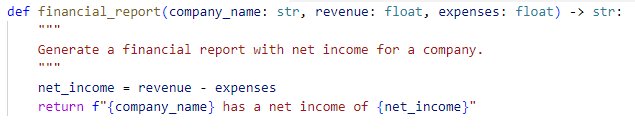
- Function takes three arguments: company_name, revenue, and expenses.
- Returns a string output calculating the net_income.
- Use a clear docstring to describe the function’s purpose and parameters.
Converting the Function to a Tool
- Use the @tool decorator (imported from LangChain or LangGraph) to convert the function into a tool:

The decorator modifies the function so it:
- Has .name attribute (defaults to the function name).
- Uses the function’s docstring as the tool’s description.
- Has return_direct=False by default.
After decorating, you can inspect the tool’s attributes:
- .name returns the tool name (function name by default).
- .description shows the function’s docstring.
- .return_direct status (False by default).
- Tool arguments and their expected types can also be inspected (e.g., company_name: str).
Integrating the Custom Tool with a ReAct Agent

The agent:
- Receives the input string with company details.
- Decides to call the financial_report tool.
- The tool returns the generated report string.
- The LLM processes this tool output and generates a final human-readable response.
V7: Integrating Document Loaders
Retrieval Augmented Generation (RAG)
- Pre-trained language models (LLMs) cannot access real-time or external data — their knowledge is limited to training data.
- RAG allows models to overcome this by incorporating relevant external documents during inference.
- A user query is embedded and matched to relevant documents in a database.
- Retrieved documents are appended to the prompt as context, enhancing the model's response quality.
RAG Development Steps in LangChain
- Document Loading: Ingest documents using LangChain’s document loaders.
- Document Chunking: Split documents into smaller chunks to facilitate indexing and retrieval.
- Document Encoding & Storage: Encode the chunks (usually into vectors) and store them in a retrievable format, like a vector database.
LangChain Document Loaders
- Document loaders in LangChain are classes that prepare different document formats for AI processing.
- PDFs
- CSVs
- HTML
- Amazon S3-hosted files
- Jupyter Notebooks
- Audio Transcripts (e.g., from transcription APIs)
- All loaders share similar syntax, making it easy to learn and scale across formats.
- Reference: LangChain Document Loaders
PDF Document Loader
Using PyPDFLoader
- Use the PyPDFLoader class from LangChain.
- Pass the file path to the constructor.
- Call .load() to ingest the PDF.
- Assign the loaded content to a variable (e.g., data) and inspect it.

CSV Document Loader
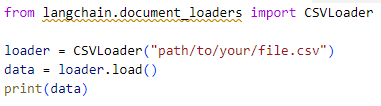
Using CSVLoader
- Use CSVLoader class.
- Pass file path, then call .load() to extract content.
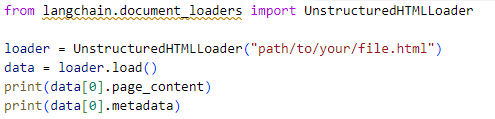
HTML Document Loader
Using UnstructuredHTMLLoader
- Use UnstructuredHTMLLoader class.
- Content can be accessed via subsetting.
- Metadata is available using the .metadata attribute
V8: Splitting external data for retrieval
Importance of Document Splitting
- Document splitting, or chunking, breaks long documents into smaller parts (chunks) that can fit within an LLM’s context window.
- This enables efficient retrieval of relevant portions of external documents during Retrieval Augmented Generation (RAG).
Chunking Strategy Considerations
Naive Line-by-Line Splitting
- Example: Splitting an academic paper's introduction by line.
- Problem: Sentences often span multiple lines; naive line splitting may lose context as LLMs receive fragmented ideas.
Chunk Overlap
- Chunk overlap involves repeating a few tokens/characters from one chunk into the next to maintain context.
- Helps preserve continuity between chunks for better comprehension by the LLM.
- If the model outputs incorrect or incomplete answers from documents, increase the overlap.
No Universal Best Splitting Strategy
- Optimal splitting depends on document type and use case.
- Tradeoff: Larger chunks = better context but fewer per-query; Smaller chunks = easier to retrieve but risk losing coherence.
- CharacterTextSplitter
- RecursiveCharacterTextSplitter
- Chunking is an active research area; stay updated on improvements
CharacterTextSplitter
Description & Behavior
- Splits text based on a specified separator, then attempts to enforce chunk_size and chunk_overlap.
- Can fail if separator-based splits don’t result in chunks smaller than chunk_size

Despite chunk_size=24, some chunks are larger than 24 characters because the split relies solely on the separator.
This method may not be robust for fine-grained chunking needs.
RecursiveCharacterTextSplitter
Description & Behavior
- Paragraphs → Sentences → Words → Characters
- Forms chunks that stay under chunk_size, attempting to retain more natural structure.
- More adaptive and context-aware, particularly for longer or more complex documents.

Output chunks vary in length but respect the chunk_size constraint.
Smaller, less meaningful chunks may occur — more noticeable in short text.
Performs better with large documents where fallback to finer splits is more useful.
Splitting Other File Formats (e.g., HTML)
HTML Chunking with RecursiveCharacterTextSplitter
When working with HTML documents loaded via UnstructuredHTMLLoader, use .split_documents() instead of .split_text().

V9: RAG storage and retrieval using vector databases
After loading and splitting documents into chunks with appropriate chunk_size and chunk_overlap, the next step is to store these chunks for retrieval during inference.
The final part of the RAG workflow involves embedding documents and storing them in a vector database for similarity-based search and retrieval.
Understanding Vector Databases
Purpose and Function
- A vector database stores embedded document chunks as vectors that capture the semantic meaning of the text.
- At query time, a user question is also embedded, and the vector DB performs a similarity search to retrieve relevant document chunks for LLM input.
Use Case in RAG
- Enables dynamic insertion of relevant context into the model's prompt, improving the relevance and accuracy of responses.
Choosing a Vector Database
Factors to Consider
- Open-source vs proprietary: Choose open-source if customization is critical.
- Data storage policy: Some applications may not allow off-premises (cloud) storage.
- Latency and performance: Lightweight in-memory DBs may suffice for small use cases; larger-scale applications need high-performance solutions.
Database Chosen in Course
- ChromaDB is used due to its lightweight, fast setup and ease of use, suitable for demo and prototyping scenarios.
Setting Up Chroma with OpenAI Embeddings
Step-by-Step Setup
- Instantiate an embedding model from OpenAI

- Create a Chroma vector database from parsed documents:

- Convert vector DB to retriever for integration with LLM:

search_type="similarity": fetches semantically similar chunks.
k=2: retrieves top 2 matches.
Chaining Components Using LCEL
Building the RAG Chain
- retriever → prompt_template → LLM
- "guidelines" ← retrieved documents
- "copy" ← actual input passed via RunnablePassthrough

Executing the Chain
- Input some text with violations of the guidelines.
- Output: The model fixes the copy using retrieved guideline documents.
- Example: A sentence violating capitalization and user reference rules is corrected automatically.