Historical context: the four assurance levels in the risk table are retained from the older framework used by these notes. Password rules and authentication guidance evolve; this table is not presented as the current NIST framework.
Authentication
verifies an identity by linking it to an individual or subject through
- Knowledge Factors: What entity knows (e.g., password).
- Ownership Factors: What entity has (e.g., a card).
- Human Factors: What entity is (e.g., fingerprint).
- Location Factors: Where entity is.
User authentication has two functions:
- Identification: Users provides their identity to system
- Verification: after identifying, users need to prove their identity
Multi-Factor Authentication (MFA)
MFA uses multiple authentication factors to confirm identity.
For instance, in the movie Mission Impossible, the character uses:
- A chip card (ownership),
- A forged fingerprint (human),
- Physical access to a location (location), and
- A password (knowledge).
Identification and Authentication for IT Systems
NIST published a framework in 2016 for protecting IT systems:
| Basic Security Requirements | |
| 1 | Ensure all users, processes, and devices are identifiable. |
| 2 | Verify identities before granting access to the system. |
| Derived Security Requirements | |
| 1 | Require at least two forms of verification for privileged and some non-privileged accounts. |
| 2 | Use methods like OTPs to prevent replay attacks. |
| 3 | Don’t reassign usernames for a set period after retirement. |
| 4 | Disable accounts after prolonged inactivity. |
| 5 | Require minimum standards for password complexity. |
| 6 | Block reuse of recent passwords. |
| 7 | Allow one-time passwords that users must change immediately. |
| 8 | Secure passwords through hashing/encryption. |
| 9 | Avoid feedback that reveals specific errors (e.g., incorrect username vs. password). |
Model for Digital User Authentication
Models purpose is to ensure only legitimate users can access systems
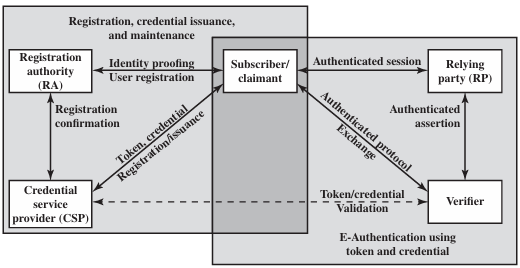
Registration Phase
- Applicant applies to be registered with a Registration Authority (RA)
- RA confirms user identity to a Credential Service Provider (CSP)
- CSP issues an electronic credential that binds user identity to a token
Authentication Phase
- User (claimant) wants to access system, they present token to a Verifier
- Verifier confirms if token matches identity and sends assertion of this identity to Relying party (RP) {system the user wants to access}
- RP uses assertion to decide on access control for the claimant
Risk Assessment for User Authentication
Discusses a framework for assessing the risks associated with authentication failures in information systems
Assurance level refers to the degree of confidence that a system is functioning securely in context of authentication and identity verification.
- Level 1: Minimal confidence; suitable for low-stakes situations (e.g., discussion board registration) with basic user ID and password.
- Level 2: Moderate confidence; used for business interactions requiring initial identity verification with secure authentication protocols.
- Level 3: High confidence; for accessing significant value services (e.g., confidential patents) requiring at least two independent authentication methods.
- Level 4: Very high confidence; for very high-value services (e.g., law enforcement databases) needing multiple authentication factors and often in-person registration.
Assurance Levels suitable
| Authentication error hogya tou | 1 | 2 | 3 | 4 |
| Inconvenience, distress, or damage to standing or reputation | Low | Mod | Mod | High |
| Financial loss or organization liability | Low | Mod | Mod | High |
| Harm to organization programs or interests | None | Low | Mod | High |
| Unauthorized release of sensitive information | None | Low | Mod | High |
| Personal safety | None | None | Low | High/mod |
| Civil or criminal violations | None | Low | Mod | High |
if the potential impact is low, an assurance level of 1 is adequate. If the potential impact is moderate, an assurance level of 2 or 3 should be achieved. And if the potential impact is high, an assurance level of 4 should be implemented.
Impacts category:
- Low: Insignificant unrecoverable loss
- Mod: Serious unrecoverable loss
- High: catastrophic unrecoverable loss
If Authentication Error hwa and inconvenience ka impact on your organization is low tou assurance level 1 is good for your software.
Passwords
Passwords are a common form of knowledge-based authentication.
Problems with passwords:
- Password snooping:
Attackers can capture passwords from network traffic or malware. - Password guessing/cracking:
Attackers try dictionary or brute-force attacks to guess passwords. - Human errors:
People often reuse weak passwords, making systems vulnerable.
Attacks on Passwords:
| Attack Name | Description | Countermeasure | |
| 1 | Offline Dictionary Attack | Hackers access the password file and compare password hashes to common passwords. | Secure password file access, intrusion detection, rapid password reissuance. |
| 2 | Specific Account Attack | Targeting a specific account with repeated password guesses | Implement account lockout mechanisms after a set number of failed attempts |
| 3 | Popular Password Attack | Using commonly known passwords against multiple user IDs. | Policies to prevent common password selection and monitoring for submission patterns. |
| 4 | Password Guessing Against Single User | Guessing a password based on knowledge of the user and system policies | Enforce strong password policies |
| 5 | Workstation Hijacking | Attacker takes control of an unattended workstation. | Auto-logout after inactivity and behavior detection |
| 6 | Exploiting User Mistakes | Users may write down complex passwords or share them unintentionally | User training, intrusion detection, simpler passwords with additional authentication. |
| 7 | Exploiting Multiple Password Use | Similar passwords across different devices increase vulnerability. | Policies forbidding similar passwords on multiple devices. |
| 8 | Electronic Monitoring | Passwords sent over networks can be intercepted. | Use stronger encryption methods to protect passwords during transmission. |
Password Selection Strategies
- Passwords can be derived from memorable phrases to create a mix of letters and numbers.
- Interweave words from a phrase.
- Avoid overly common phrases
- Use computer generated Passwords
Storing Passwords methods:
Passwords should never be stored in database as plaintext
- Hashing:
When a user logs in, the system hashes the entered password and compares it to the stored hash. .
Hash algorithm is designed to be slow to prevent brute force and dictionary attacks
- Salting:
A unique salt per user makes each password hash unique, even if users choose the same password.
Salt value stored alongside user password
⨁ Multiple Users now can have same password
⨁ Offline dictionary Attack now even more difficult
⨁ Makes it impossible to determine if a user has same password across multiple systems
Adding new password to dictionary:
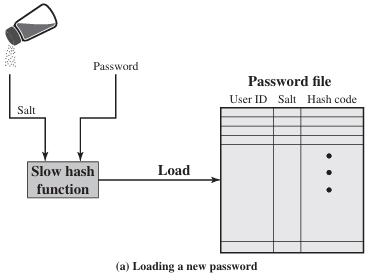
Verifying a password from dictionary:

Challenge-Response Authentication
Authentication method where one party presents a question(challenge) and the other part must provide a valid answer (response)
If the user’s response matches the system’s response, the authentication is successful without ever exposing the password itself.
⨁ No Clear text transmission
⨁ Protection from replay attacks
Process
- User sends their username to server
- Server generates a random number and sends it back to user
- User generates a response by combining random number with their hashed password
- User sends the computed response to server
- Server has computed its own response using previously stored hashed password for user.
- Server compares its own response against user response, User Authenticated if it matches
Used in: 2FA, SSL, Banking Apps, Cloud services
One-time Passwords (OTP)
Are Passwords that only work once. Solution for environments where password longevity can create vulnerabilities
S/key algorithm
- User chooses initial key K1
- Recursive hashing: H(K1) = K2, H(K2) = K3,... H(Kn-1) = Kn
- One-time passwords: P1 = Kn, P2 = Kn-1, ... Pn = K1
- Hard to deduce next password Pi from previous Pi-1
Security issues for user Authentication
- Eavesdropping: Interception of communication to capture sensitive information like passwords or tokens.
- Denial of service Attack: Makes service unavailable by overwhelming it with illegitimate requests.
- Trojan Horse: Malicious software disguised as legitimate software to gain unauthorized access or steal information.
- Host Attacks: Target the server to manipulate or access stored authentication credentials.
- Replay Attacks: An adversary retransmits captured authentication data to gain unauthorized access.
- Client Attacks: Exploits vulnerabilities in the user's device to access stored credentials or tokens.
Access Control
Is a security process that involves:
- Determining what CRUD actions a subject is allowed to perform.
- Controlling and assigning specific permissions to subjects, often through role-based models like RBAC
- Authorization, determining what each user or process can access.
Subjects: entity that performs actions in a system (users, processes)
Objects: Resources that Subjects can access or manipulate (files, databases, data)
World: Refers to all other users in the system who do not fall into the owner or group categories. They are granted the least access rights.
Group: A collection of users who share access rights to a resource.
Discretionary Access control: Type of access control mechanism that allows resource owners to determine who has access to their resources and what actions they can perform.
Access control matrix:
Matrix structure helps visualize and manage which actions each subject can perform
Access-control matrix
| Subject / object | File 1 | File 2 | Process 1 | Process 2 |
|---|---|---|---|---|
| User 1 | read | — | control, send | receive |
| User 2 | write | read | send | — |
| User 3 | read, execute | read | control | control |
A column describes an object’s access control list. A row describes a subject’s capabilities. For File 1: User 1 may read, User 2 may write, and User 3 may read and execute. User 2 may write File 1, read File 2, and send to Process 1.
Access Control models:
Are frameworks used to manage and define permissions in a system. These models define:
- Defining Subject and Objects
- How to represent and display permissions
- Permission management
Permission Representation Methods:
- Access Control Lists (ACL)
Object-centric, Attach permissions to objects (such as files or programs).
⊕ Efficient and decentralized for managing permissions tied to objects.
⊖ hard to get a clear view of what each subject is permitted to do.
e.g. Blocking SSH access in OpenBSD with specific rules to restrict remote access.
- Capabilities
Subject-centric, Attach permissions to subjects (like users or processes).
⊕ Allows for easy listing and control of what each subject can do.
⊖ Fine-grained permission control can be challenging.
e.g. Limiting system permissions on Linux, like restricting reboot privileges.
Access matrix, ACLs, and capability lists
| Subject | File 1 | File 2 | File 3 | File 4 |
|---|---|---|---|---|
| User A | Own, Read, Write | — | Own, Read, Write | — |
| User B | Read | Own, Read, Write | Write | Read |
| User C | Read, Write | Read | — | Own, Read, Write |
Object-centric access control lists
| Object | Access control list |
|---|---|
| File 1 | User A: Own, Read, Write; User B: Read; User C: Read, Write |
| File 2 | User B: Own, Read, Write; User C: Read |
| File 3 | User A: Own, Read, Write; User B: Write |
| File 4 | User B: Read; User C: Own, Read, Write |
Subject-centric capability lists
| Subject | Capabilities |
|---|---|
| User A | File 1: Own, Read, Write; File 3: Own, Read, Write |
| User B | File 1: Read; File 2: Own, Read, Write; File 3: Write; File 4: Read |
| User C | File 1: Read, Write; File 2: Read; File 4: Own, Read, Write |
Permission Management Models:
Different systems use specific models to manage access control permissions
- Discretionary Access Control (DAC):
Owner of an object has control over access permissions.
⊕ Convenient for users.
⊖ Can be insecure if ownership of the object changes.
- Mandatory Access Control (MAC):
System enforces access control globally, without owner control.
⊕ Very secure and thorough.
⊖ Complicated and time-consuming to set up and manage.
- Role-Based Access Control (RBAC):
The system assigns permissions based on roles rather than individual users.
A Role is a defined set of permissions associated with a responsibility within an organization or system
only minimum necessary rights should be assigned to a subject that requests access to a resource.
⊕ A middle-ground solution, balancing flexibility and security.
⊕ Improves auditing since access rights are tied to roles
⊕ Separation of duties
- Attribute-based Access Control (ABAC):
Controls access based on attributes of the user, the resource to be accessed, and current environmental conditions. e.g. access rules can specify that only the creators of resources can modify them.
⊕ Supports fine-grained access control, allowing wide variety of attributes to be combined in access decisions.
⊕ Users and their attributes can change frequently, making ABAC adaptable to evolving security needs.
⊕ Can enforce various access control models
⊖ Performance impact due to managing many roles
⊖ Complex design
Example: UNIX systems
UNIX follows DAC for permission management, Owner manages who can read, write, execute.
UNIX follows ACL structure
| UNIX subjects | Description |
| User (U) | The file owner. |
| Group (G) | A group of users who share the same permissions. |
| Other (O) | Any other users not in the first two categories. |
Role-based access-control matrices
A user may be assigned to multiple roles. Permissions are then attached to the roles.
| User | R₁ | R₂ | … | Rₙ |
|---|---|---|---|---|
| U₁ | × | — | … | — |
| U₂ | × | — | … | — |
| U₃ | — | × | … | × |
| U₄ | — | — | … | × |
| U₅ | — | — | … | × |
| U₆ | — | — | … | × |
| … | … | … | … | … |
| Uₘ | × | — | … | — |
| Role / object | R₁ | R₂ | Rₙ | F₁ | F₂ | P₁ | P₂ | D₁ | D₂ |
|---|---|---|---|---|---|---|---|---|---|
| R₁ | control | owner | owner, control | read * | read, owner | wakeup | wakeup | seek | owner |
| R₂ | — | control | — | write * | execute | — | — | owner | seek * |
| … | … | … | … | … | … | … | … | … | … |
| Rₙ | — | — | control | — | write | stop | — | — | — |
Roles also appear as objects in the left columns; those columns represent rights over roles. F denotes files, P processes, and D devices. Asterisks are retained from the source diagram; it does not define their meaning.
